Guides to exporting WhatsApp Web chats
Step-by-step guides for exporting the WhatsApp Web chat you open with WA Suite: Chat Export & Backup, in Chrome, Edge, or Firefox on a computer. Each guide covers one task; the help page has every export step in one place. All guides use the WA Suite: Chat Export & Backup extension, from the Chrome Web Store, Microsoft Edge Add-ons, or Firefox Add-ons; compare plans.
Exporting a chat
- WhatsApp chat export: phone vs WhatsApp Web vs PC: where WhatsApp's own Export chat works, what each route saves, and when an extension helps.
- How to export a WhatsApp chat on a PC: the steps in Chrome, Edge, or Firefox, and where the files go.
- How to export a WhatsApp group chat: one sender or a date range, and how member lists are exported separately.
- How to export a WhatsApp chat with media: photos and files on All tools, and the missing-media report.
Choosing a file
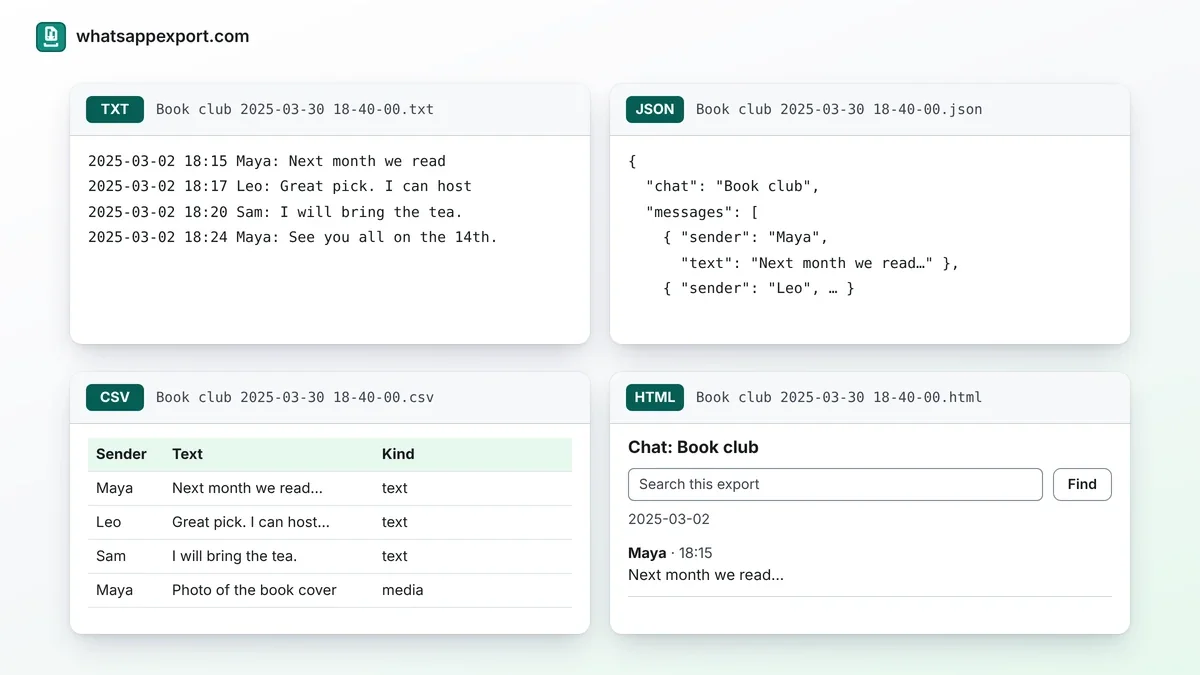
- How to export a WhatsApp chat to Excel: the CSV, its 18 columns, and opening it in Excel or Google Sheets.
- How to export a WhatsApp chat to an offline HTML page: search, jump to a date, and open it without internet.
- How to export a WhatsApp chat to PDF: Save as PDF on All tools, and a free print workaround.
- Export formats: what each file holds.
When something goes wrong
- WhatsApp export chat not working: what each message means and what to do.
- Frequently asked questions: short answers about using the extension, plans, and what it sends.