How to export a WhatsApp chat on a PC
You can export a WhatsApp chat on a PC without your phone's Export chat menu: open the chat in WhatsApp Web and use WA Suite: Chat Export & Backup (whatsappexport.com), a browser extension on the Chrome Web Store, Microsoft Edge Add-ons, and Firefox Add-ons. Its toolbar button opens a popup with five tabs (Chats, Contacts, Library, Account, Status). Tick the formats you want on the Chats tab and press Start: it saves the chat as an offline HTML page, CSV (opens in Excel), TXT, or JSON, one or more of them, with PDF on All tools. The free plan exports up to 30 messages a day; All tools ($8.99 a month, $49.99 a year, or $74.99 lifetime) has no message limit. It exports the messages WhatsApp Web has loaded and tells you where it stopped.
Can you export a WhatsApp chat on a PC?
Yes. WhatsApp Web runs in your browser, and WA Suite: Chat Export & Backup is an extension for Chrome, Edge, and Firefox that saves the chat you open there. Every export starts with your click. The extension never sends messages and never types into WhatsApp Web. An export is a readable copy on your computer, not a WhatsApp backup you can restore; the FAQ explains the difference and what the extension does in your account.
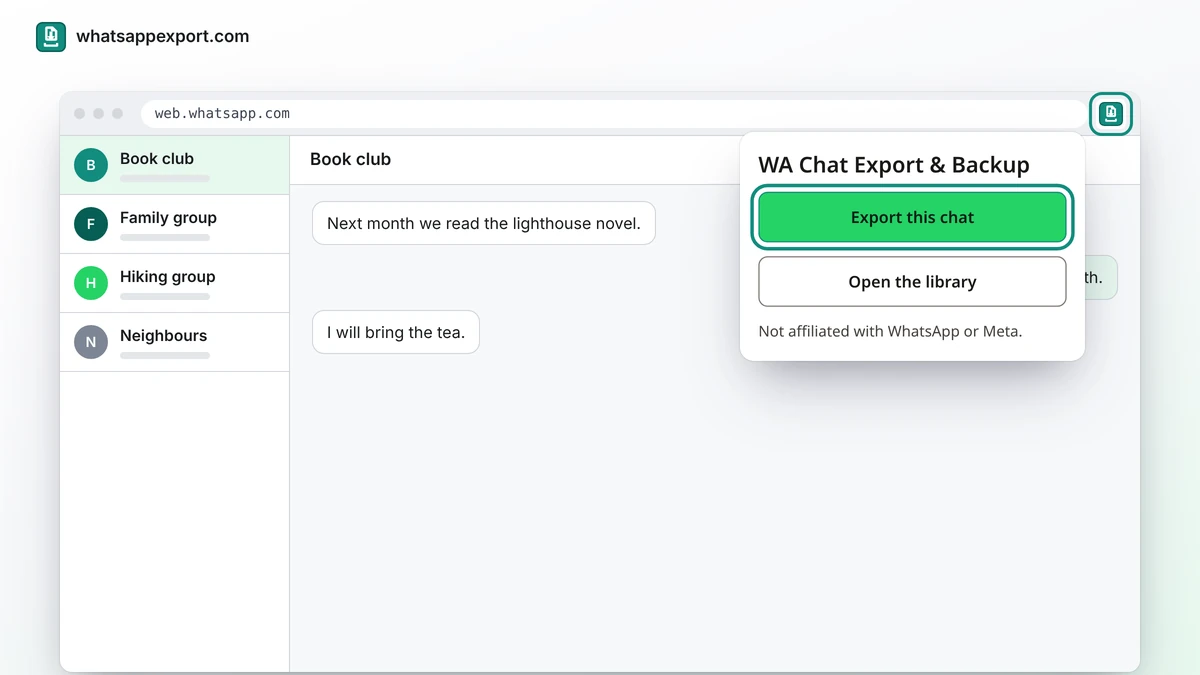
Export from WhatsApp Web in Chrome
- Add WA Suite: Chat Export & Backup from the Chrome Web Store, Microsoft Edge Add-ons, or Firefox Add-ons.
- Open web.whatsapp.com and open the chat.
- Click the extension in the browser's toolbar. Its popup (version 4.1.0 or later) opens on the Chats tab. Outside WhatsApp Web, the popup says to open web.whatsapp.com to export a chat, and its Library tab still shows your saved chats.
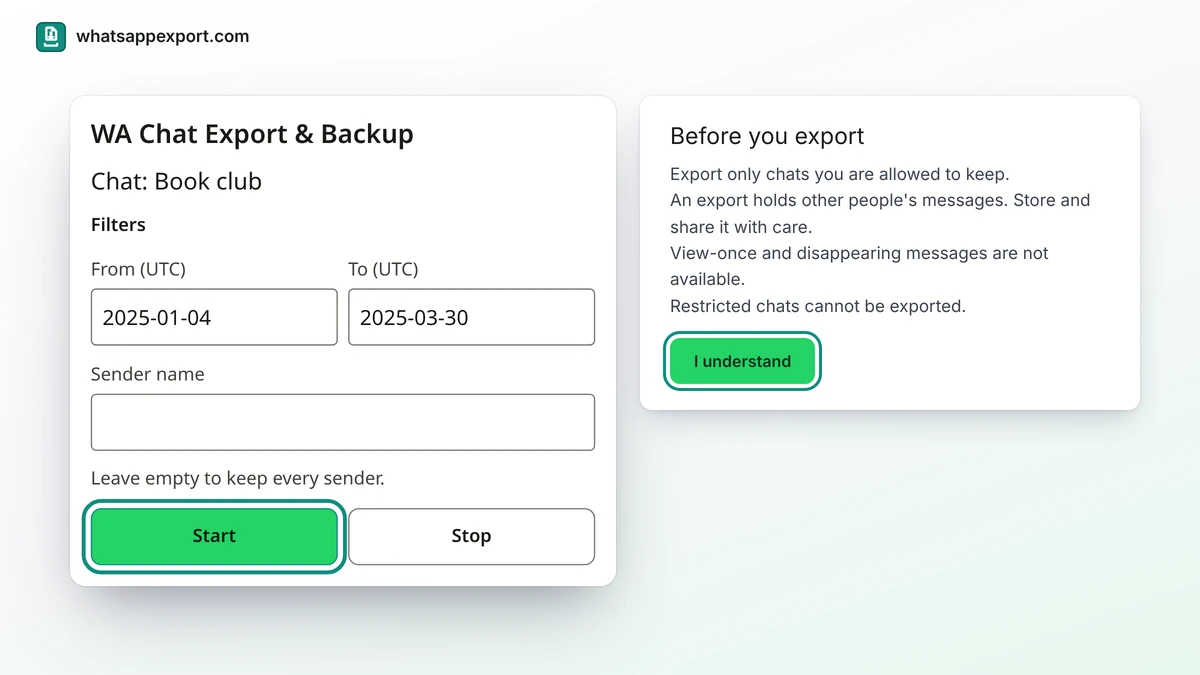
- The first time, read the notice and choose I understand. Export only chats you are allowed to keep: an export holds other people's messages.
- Under File format (version 4.2.0 or later), tick the files you want: HTML page, CSV (opens in Excel), Text (.txt), or JSON. Under Filters, choose dates or a sender if you want only part of the chat. Then press Start.
- Keep the WhatsApp Web tab open while the export runs; closing the popup does not stop it, and opening the popup again shows its progress and Stop. Press Stop to end it early; the files then hold what was read so far, and the report says the export was stopped.
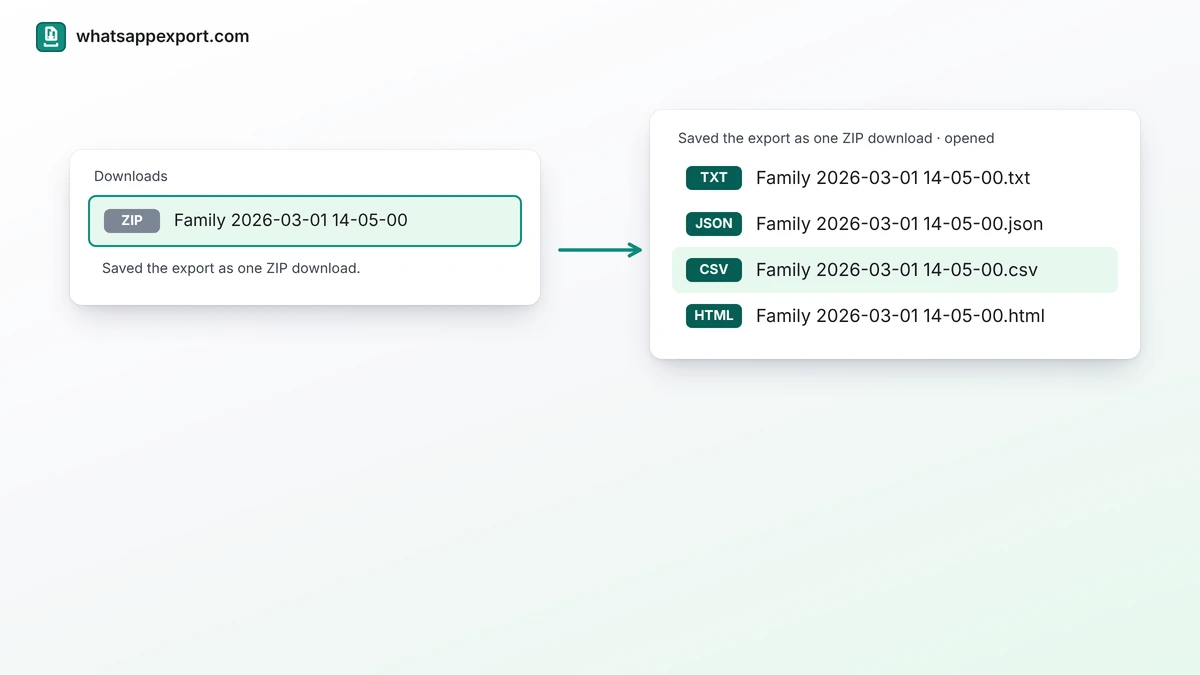
One format with no media saves as that one file; two or more save as one ZIP download with only the files you ticked. Edge may ask whether to keep the download: choose Keep or Save to finish saving. Edge may also close the popup when the download finishes; the export is done, and opening the popup again shows the result.
Free for 30 messages a day; compare Free and All tools.
Export from WhatsApp Web in Firefox
Steps 2 to 6 are the same in Firefox 142 or later, and the export saves the same way there.
Where does the exported chat go?
The file or ZIP lands where your browser saves downloads. Each file is named after the chat and the export time on your computer's clock, such as Family 2026-03-01 14-05-00.csv. The export is also added to the extension's library, where you can search it by word, sender, and date, offline.
Phone export vs WhatsApp Web export: which to use?
WhatsApp's own Export chat, described in WhatsApp's Help Center, saves the chat as a text file. If a plain text file is all you need, it may be enough. WhatsApp chat export: phone vs WhatsApp Web vs PC compares where that export works and what each route saves.
WA Suite: Chat Export & Backup saves up to four files from WhatsApp Web, the ones you tick: TXT for reading, CSV for Excel or any other spreadsheet, JSON for programs, and an offline HTML page with search and a date jump. Each file starts with a completeness report, and every export is kept in a library you can search. Compare the export formats to choose which to tick.
What an export from WhatsApp Web may miss
- WhatsApp Web may not load a chat's oldest messages. The export says where it stopped.
- View-once and disappearing messages are not available, and are counted in the report.
- Restricted chats cannot be exported.
- If the WhatsApp tab closes or reloads during an export, no file is saved. Pressing Stop saves what was read so far.
The help page has the rest of the details.
If the chats you want to save are on Discord instead, see DiscordSuite. For chats with ChatGPT, Claude and other assistants, see AI Chat Export Suite.
Common questions
Does it work with the WhatsApp desktop app?
No. It works only with WhatsApp Web, web.whatsapp.com, in Chrome, Edge, or Firefox on a computer. It does not work in the WhatsApp phone apps either.
Where are the files saved?
In your browser's downloads folder: one file for one format, or one ZIP for two or more.
Do I need my phone?
WhatsApp Web needs your phone's WhatsApp account linked to it. Older messages that are only on your phone load only in some WhatsApp Web display languages; in the others, the export ends at what the browser holds and says so. While older messages load, keep the phone online with WhatsApp open.